 Doc Scan
How to scan documents on iPhone and save them as PDF
Your iPhone camera is a perfectly good document scanner. Here is how to get a straight, clean, multi-page PDF, with nothing but the apps you already have, or with Doc Scan when you scan often.
Updated
Free, with apps already on your iPhone
Use the scanner in Files or Notes
Since iOS 13, Apple’s document camera is built into the Files and Notes apps.
- Open Files, tap the ••• button at the top, then Scan Documents. In Notes, tap the camera button in a note and choose Scan Documents.
- Hold the iPhone over the page. It finds the edges and captures automatically; keep going for more pages.
- Tap Save. Files saves a PDF to the folder you choose; Notes keeps the scan inside the note.
Good for an occasional page. There is no searchable library of scans, no page numbers or password, and editing a scan later is limited.
With Doc Scan
Use Doc Scan
Doc Scan uses the same document camera, then keeps every scan in a searchable library with folders and iCloud sync.
- Tap + on the home screen and choose Scan.
- Capture the page, or several pages in a row. Edges are found and the page is flattened automatically.
- Open the document to rotate a page, Enhance it or switch to Black & White.
- Tap Share and choose PDF or JPG. Before a PDF goes out you can add page numbers, a watermark or a password.
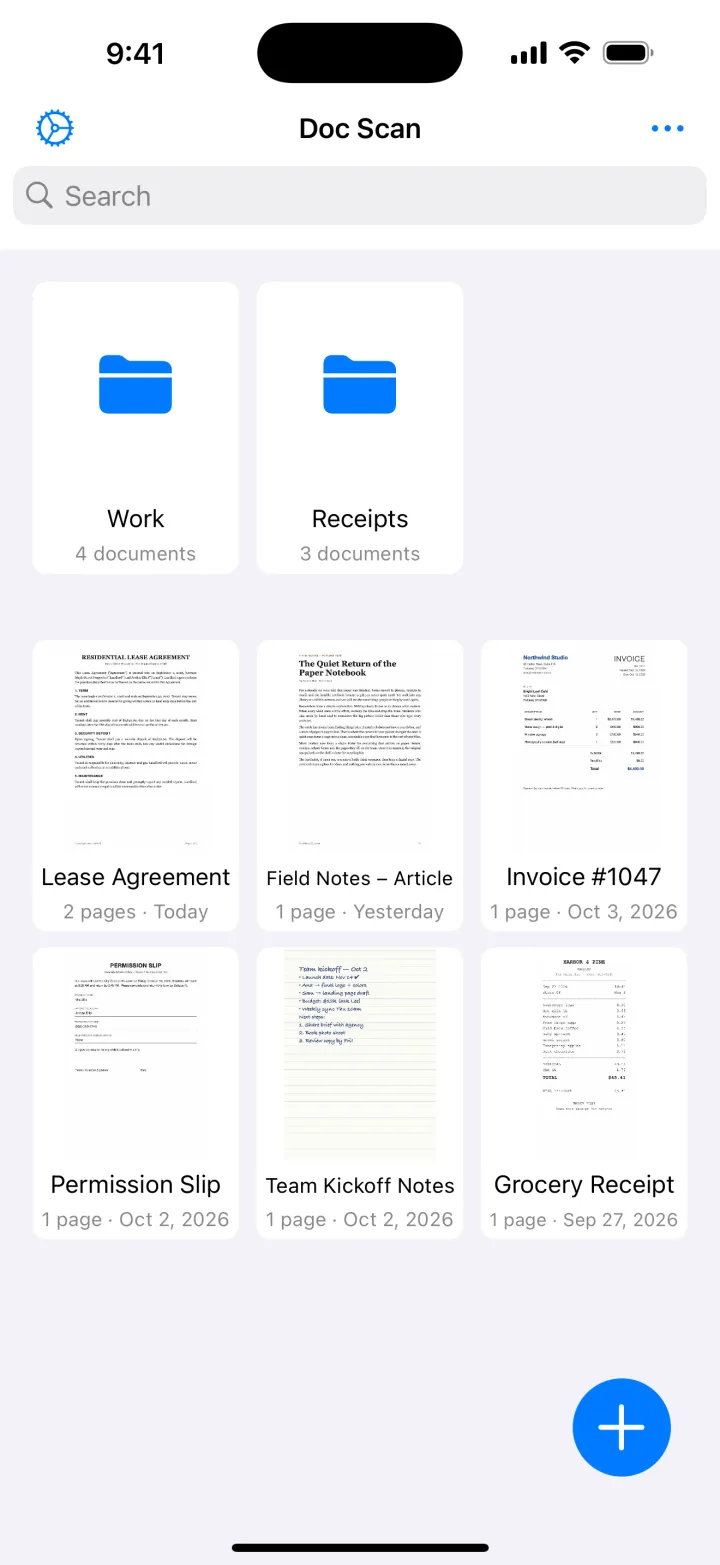
Scanning, folders, iCloud sync and JPG export are free. PDF export is part of Premium.
Download on theApp StoreTips
- Put the page on a darker surface than the paper; the edges are found faster and cropped tighter.
- Avoid your own shadow: light from the side or above works better than light from behind you.
- Scan all pages of a contract in one go so they stay together as one document.
Questions
Is there a free document scanner on iPhone?
Yes. Files and Notes both have Scan Documents built in, and Doc Scan is free to scan and export as JPG.
Can I scan several pages into one PDF?
Yes. Keep capturing before you tap Save; in Doc Scan you can also tap Add later to append more pages to the same document.
Does it work on iPad?
Yes. The document camera works on iPad too, and Doc Scan syncs your scans between iPhone and iPad through iCloud.